
MalodyV
MugzoneMusic
3.341.00 Reviews
- Version
- 6.7.22
- Installs
- 100.00K
- Age Rating
- Everyone
Screenshots
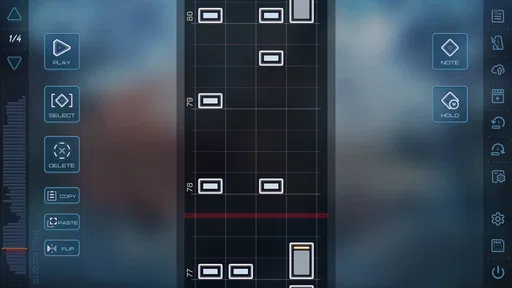
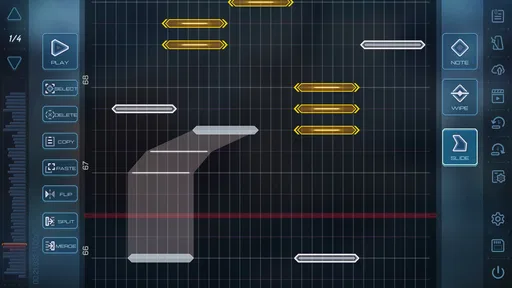
Our Review of MalodyV
 Analysis by Appyee
I spent time with MalodyV as a music game and came away with a mixed but fairly clear impression: it is aimed at players who enjoy rhythm-focused interaction and do not mind learning their way around a compact, somewhat technical interface. The game is free to install, developed by Mugzone, and its store summary presents it as the next generation of Malody. That description gives the right general direction, but it does not fully explain who will feel comfortable using it day to day.
What makes this release interesting is not simply tapping along to music. The experience is closer to a rhythm-game environment for people who want precision, repeated practice, and a sense of control over how they play. At the same time, that focus creates barriers for anyone who needs very clear navigation, forgiving timing, low visual density, or a relaxed way to enjoy music without constant concentration.
How MalodyV feels to navigate and read
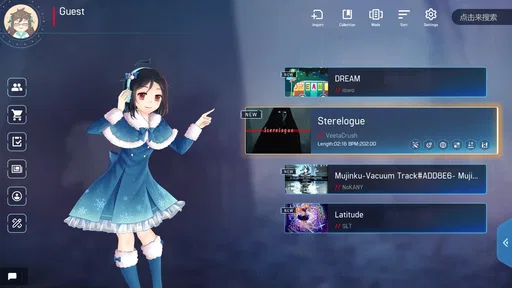
My first impression was that MalodyV expects the player to be willing to explore. The presentation feels more functional than welcoming, so I would not recommend opening it while expecting an immediately obvious path from the home screen to a comfortable first song. Players familiar with rhythm games will probably recognize the general logic quickly, while newcomers may need a little patience before the menus and play options feel natural.
That matters for accessibility because navigation is part of the game’s learning curve, not just a preliminary step. A player with strong vision and plenty of time can usually compensate by trying buttons, backing out, and repeating the process. Someone who relies on magnification, has difficulty distinguishing small interface elements, or becomes tired when scanning dense screens may find that same exploration much more demanding.
I found it useful to approach the game in short sessions at first. Instead of trying to understand every option in one sitting, I would choose a simple goal, enter a play session, and then return to the menus later. This reduces the amount of visual and mental information competing for attention. It is a practical workaround, although it also shows that the interface does not always guide the player as gently as a more casual music game would.
Text readability is closely tied to the device being used. On a larger screen, the play area and interface elements have more room to breathe. On a smaller phone, the same information can feel compressed, especially when the action becomes busy. I would strongly suggest testing the game in portrait or landscape arrangements available on your device rather than assuming one orientation will suit everyone. The most comfortable setup depends on how you hold the phone and where your hands naturally rest.
One useful habit is to separate configuration from performance. I prefer making adjustments before starting a serious attempt, then keeping the phone in a stable position rather than changing settings repeatedly between songs. This is particularly helpful for players who have limited reach or who need to avoid frequent hand repositioning. It also makes comparisons between attempts more meaningful because fewer physical variables are changing.
The game’s audience size suggests that it has found a real community: it has passed 100K+ installs, while its average rating sits at 3.3. I read that combination as a sign of a specialized experience with genuine appeal but uneven accessibility for the broader mobile audience. It is not necessarily a warning that the game is poor; rather, it suggests that expectations matter. This is more likely to reward a patient rhythm-game player than someone looking for a universally simple interface.
Reading the playfield under pressure
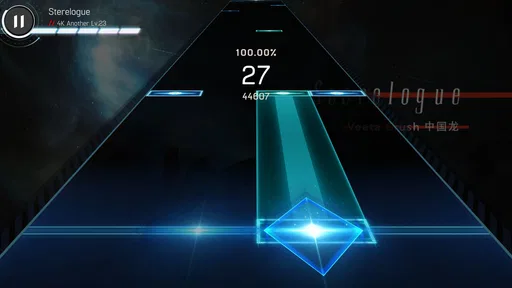
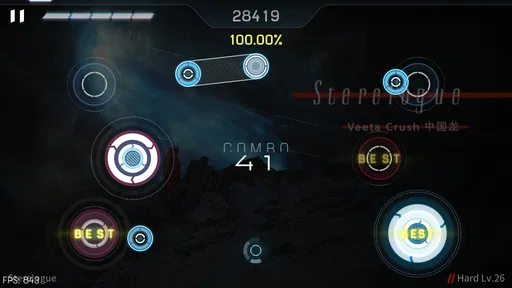
During play, readability becomes more important than menu design. Rhythm games ask the eyes to identify incoming information, estimate timing, and connect that information to a physical response. If the notes, lanes, or effects become visually crowded for you, the difficulty can rise for reasons that have little to do with musical skill.
I would begin with a slower or less demanding setup and pay attention to whether mistakes come from timing or from losing track of what is on screen. That distinction is valuable. If I miss because I cannot visually separate events, repeating the same challenge may not solve the problem. A better approach is to reduce the amount of stimulation where the game allows it, use a larger display, or choose a play style that places less pressure on rapid visual tracking.
Players with color-vision differences should personally check whether the game’s visual distinctions are comfortable before committing to long sessions. I would not assume that colors alone will be sufficient for every player, and I would avoid judging the game’s accessibility from screenshots. The real test is whether important events remain recognizable when several notes arrive close together and the screen is moving quickly.
For players with photosensitivity or motion sensitivity, caution is sensible. Rhythm games naturally combine movement, changing patterns, and repeated visual events. I would try a brief session in a well-lit room and stop if the display feels uncomfortable. This is not a criticism unique to MalodyV, but the game’s precision-focused design means you may spend longer watching the playfield than you would in a casual music title.
Motor demands and different ways of playing
MalodyV is easiest to appreciate when your hands can make quick, accurate inputs for extended periods. That does not mean every player needs exceptional reflexes, but it does mean the physical demands are central to the experience. Repeated tapping, holding the phone securely, and reacting to patterns can become tiring for people with limited dexterity, tremor, joint pain, or one-handed use needs.
I found that device placement makes a bigger difference than I expected. Holding the phone in midair adds strain and can make inaccurate taps feel like a skill problem. Resting it on a stable surface, or using a case that keeps it from sliding, can make practice more comfortable. This is one of the simplest improvements a player can make, and it avoids changing the game’s challenge while reducing unnecessary physical effort.
Another practical tip is to treat accuracy and endurance as separate goals. A short attempt with deliberate movements may be more useful than a long session that leaves your hands tense. If you experience discomfort, stopping early is better than forcing another run. The game is built around repetition, so preserving comfort gives you a better chance of returning consistently.
Players who use one hand should not assume that every part of the experience will feel equally manageable. Menus may be easier than active play, and some play styles may suit one-handed reach better than others. I would test the basic interaction before spending money inside the game. The available in-app purchases range from $0.99 to $2.99 per item, so it makes sense to understand whether the core controls fit your body and device first.
People who use external switches, remapping tools, voice control, or other assistive methods should check the game in their own setup rather than expecting those methods to translate cleanly. A rhythm game depends on precise timing, and an input method that works well for navigation may introduce delay or awkward positioning during play. That trade-off can make a different, more deliberately accessible music game a better choice.
Sound, attention, and sensory comfort
Music is obviously central here, but sound is not only an entertainment layer. It can help players anticipate timing, reinforce the rhythm, and reduce dependence on visual tracking. For someone who processes audio comfortably, listening carefully may make patterns easier to follow. For someone with hearing loss or sound sensitivity, the same design can feel less useful or more tiring.
I recommend trying the game at a moderate volume and paying attention to whether the audio supports your concentration or competes with it. Headphones can make timing cues easier to hear, but they are not automatically the best option for every player. Some people need to remain aware of their surroundings, while others may find close, continuous sound fatiguing. The most practical choice is the one that lets you focus without discomfort.
Players who are deaf or hard of hearing may still enjoy the visual rhythm aspect, but the experience can change if important timing information is primarily perceived through sound. I would not describe the game as equally suited to every sensory profile without testing it personally. If you rely heavily on visual feedback, watch for moments when the screen gives you enough information to act confidently rather than depending on the music alone.
Attention is another overlooked issue. A rhythm game can be difficult to pause mentally once a sequence begins, and frequent visual changes may be exhausting for players with attention regulation needs. I found that short, planned sessions work better than treating the game as background entertainment. It rewards active focus, so it is not the best pick if you want something to play while watching another screen or carrying on a conversation.
Using it in real situations
In an everyday scenario, I can imagine playing MalodyV during a quiet break at home, with the phone supported on a table and enough time to concentrate on one attempt. That setting suits the game well. I can adjust my posture, keep the screen at a comfortable distance, and stop between runs without feeling rushed.
The same game is less convenient on a crowded commute. Movement makes accurate tapping harder, outside noise can interfere with musical timing, and holding a phone securely while standing creates extra strain. Even if the game launches normally, the experience may be frustrating because the environment is working against the precision it expects.
It also deserves thought in shared spaces. A player may need headphones to avoid disturbing others, but headphones can make environmental awareness more difficult. In a workplace, classroom, or public area, the concentration required may not fit the situation. I see MalodyV as a deliberate activity rather than an ideal filler for every spare minute.
For families, the Everyone content rating makes the game broadly suitable from an age-classification perspective. That does not mean every child will find it easy. Younger players may need help understanding the interface, and the precision required can feel discouraging if they expect a simple tap-and-play music toy. I would introduce it as a practice-based game, not as an effortless entertainment app.
Older players or people returning to rhythm games may appreciate the chance to go at their own pace, but the interface can still be a hurdle. A larger phone or tablet-like screen may help with visibility, while a stable playing surface can reduce hand fatigue. If the player has significant visual, motor, or hearing needs, I would test the free version carefully before considering any optional purchase.
The minimum operating-system requirement is Android 6.0, which makes the game available to a fairly broad range of Android devices. Compatibility alone does not guarantee a comfortable experience, though. Screen size, touch responsiveness, speaker quality, and device stability can all affect how fair the game feels. A phone that handles ordinary apps well may still be less pleasant for rapid rhythm input.
Where the design still creates barriers
The biggest barrier for me is the gap between technical possibility and immediate clarity. MalodyV feels like a game for players willing to learn its structure, but accessibility often improves when the first steps are obvious and the interface communicates priorities clearly. If you need a calm onboarding experience with large, unmistakable controls, this may feel demanding before the music even starts.
There is also a difference between adjustable difficulty and accessible difficulty. Making a chart easier can reduce the number of inputs, but it does not automatically solve small text, visual clutter, awkward reach, or sensory overload. Players should judge the whole interaction rather than assuming that a lower challenge level will remove every obstacle.
The average rating of 3.3 from around 786 ratings reflects a divided public response. I would not use that figure as a final verdict, but it does support my impression that the game will not suit everyone equally. The experience has a specific identity, and that identity can be a strength for dedicated rhythm players while feeling restrictive to casual users.
The purchase model is another small consideration. The game itself is free, but optional items cost between $0.99 and $2.99 each. I like being able to try the basic experience before paying, especially when physical comfort and readability are personal questions. Still, I would avoid buying extras until I knew that the controls, visual presentation, and session length worked well for me.
MalodyV is also not the obvious alternative for someone who mainly wants licensed pop songs, a social party atmosphere, or a very gentle introduction to rhythm games. A more mainstream music game may offer a clearer first-run experience and more immediate entertainment. On the other hand, those alternatives may not appeal to a player who wants a more focused, practice-oriented environment.
Who should choose it, and who should skip it?
I would recommend it to a player who enjoys testing timing, repeating sections to improve, and learning a game’s particular control language. It is especially appealing if you prefer a music game that asks for attention rather than one that plays almost like an interactive playlist. The free entry point makes it reasonable to experiment before deciding whether it belongs on your phone.
I would be more cautious if you need large, highly legible controls, minimal menu exploration, or a low-stimulation experience. Players with hand pain, limited reach, significant visual tracking difficulty, or sensitivity to rapid screen activity may find the core design tiring. That does not make the game unusable for everyone in those groups, but it does make a personal trial essential.
If your priority is accessibility first, I would compare it with alternatives that clearly advertise adjustable visuals, simplified controls, or stronger support for different input methods. If your priority is rhythm-game depth and you are comfortable adapting your setup, MalodyV deserves a fair try. The important trade-off is that its specialized appeal comes with a steeper responsibility placed on the player.
My inclusive verdict
After using it, I see MalodyV as a focused music game with a real audience, not a universally effortless mobile experience. Mugzone has created something that can be rewarding when the screen, posture, sound, and control demands line up with the player. It is less convincing when someone needs the game to explain itself immediately or accommodate a wide range of physical and sensory needs without extra preparation.
The current version is 6.7.22, and the game has been available since June 7, 2022. Those details place it as an established entry rather than a brand-new experiment, but the practical question remains personal: can you read the playfield comfortably, make the required inputs without strain, and stay focused on the music? I would answer those questions during a short free trial before making any purchase.
My recommendation is therefore positive but selective. Choose MalodyV if you want a serious, practice-driven rhythm experience and are willing to shape your playing setup around it. Skip it in favor of a simpler or more accessibility-forward music game if clear navigation, relaxed controls, or broad sensory flexibility matter more than precision. For the right player, it can become a satisfying musical challenge; for others, the interface and physical demands may outweigh the fun.
Verdict
Strengths of MalodyV
- Supports multiple rhythm-game modes, including keys, taiko, catch, and beat styles.
- Offers detailed chart customization for players who enjoy creating their own levels.
- Online features let you share charts and compete with other rhythm-game players.
- Accurate timing tools help experienced players fine-tune offset and calibration settings.
- Works well for challenging players seeking a more technical rhythm-game experience.
Limitations of MalodyV
- Its interface can feel complicated and dated for newcomers to rhythm games.
- Many songs and charts may require extra downloads or community-made content.
- Higher difficulty charts can be frustrating without a compatible external controller.
- Online content quality varies, so some charts may feel unbalanced or unfinished.
- Some advanced features and content may require purchases or additional setup.
Similar Picks in This Category
View All
Tiles Hop Music & Ball Game
AMANOTES PTE. LTD.4.3

Magic Tiles 3™ - Piano Game
AMANOTES PTE. LTD.4.6

Real Piano
Bilkon3.7

Piano Game: Classic Music Song
Dream Tiles Piano Game Studio4.0

Smash Colors: Music Ball Rush
BADSNOWBALL HONGKONG LIMITED4.2

Piano Music Go-EDM Piano Games
Joy Journey Music Games4.5
Frequently Asked Questions
What is MalodyV?
MalodyV is a rhythm game focused on challenging players with music-based note patterns. It is designed for people who enjoy tapping, holding, sliding, and timing notes to songs, while also offering a strong community and customization element. Depending on the mode and available content, the experience can feel closer to a traditional rhythm arcade game, a beatmap challenge, or a competitive score-attack title.
Which game modes are available in MalodyV?
MalodyV is known for supporting several rhythm-game styles rather than limiting players to one format. Available modes may include chart types inspired by keyboard, mania, catch, taiko, and other note-based systems, although the exact selection can depend on the current version and platform. Before downloading, players should check the latest store description because features and supported modes can change through updates.
Can I create, import, or download custom charts in MalodyV?
Custom content is one of the most appealing parts of MalodyV. Players can generally explore community-created beatmaps and, depending on the version, use tools or supported formats to create and share their own charts. This greatly expands the music library beyond the default content. However, chart quality, song availability, and compatibility can vary, so users should expect some community content to require adjustment or additional setup.
Does MalodyV require an internet connection?
MalodyV may work for some gameplay sessions without a constant internet connection, particularly when songs and charts are already stored on the device. Nevertheless, online access is important for downloading content, synchronizing or sharing scores, accessing community features, and receiving updates. Players should also remember that custom chart services may depend on server availability, and offline functionality can differ between platforms and app versions.
Is MalodyV suitable for beginners, and does it include difficulty options?
MalodyV can be suitable for beginners, but its overall difficulty may feel demanding because rhythm-game communities often create advanced charts for experienced players. New users should begin with easier levels, adjust note speed and visual settings, and spend time learning the timing system before attempting difficult songs. The game is most enjoyable for players willing to practice, as progress depends heavily on rhythm, accuracy, and familiarity with each chart.
Play our best games!


